

Your phone slips out of your pocket as you sit down, bounces off the pavement, and lands screen-first. That spiderweb crack across the display often means a repair bill that costs more than your monthly phone payment. Most phone damage happens in ordinary moments like this one, not dramatic accidents.
The good news is that a few consistent habits can lower your risk of drops, scratches, and cracks significantly. And when damage does happen anyway, knowing where to turn matters just as much as knowing how to prevent it. For phone owners in Whitby and Lindsay, Ontario, Majestik Communications offers local repair support when prevention isn’t enough.
Here are 10 practical ways to keep your phone protected.
Why Protecting Your Phone is Important
Phones get damaged in predictable ways: dropped from pockets, knocked off counters, scratched by loose change, or cracked when they slide off a car seat. Screen replacements and battery repairs add up quickly, and a damaged phone often means lost data, reduced resale value, or an unplanned trip to a repair shop.
Prevention costs far less than repair. A protective case, a few careful habits, and some awareness of high-risk situations can keep your phone working longer and looking better.
1. Use a Protective Phone Case to Reduce Drop Damage
A protective case is the single most effective way to guard against drop damage. Cases with raised edges around the screen and camera absorb shock before it reaches the glass. Materials like TPU or polycarbonate flex on impact instead of transferring the full force to your phone.
Look for a shockproof phone case rated for drop protection rather than one chosen purely for looks. The right case adds minimal bulk while significantly reducing the chance of a cracked screen.
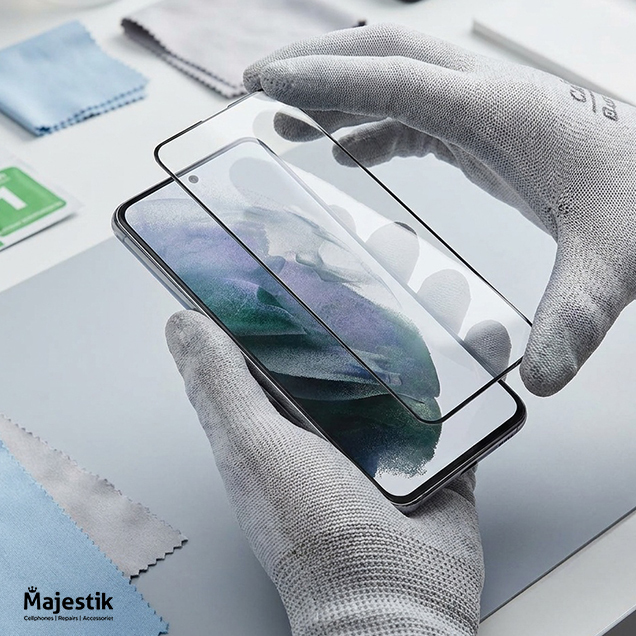
2. Add a Tempered Glass Screen Protector
A tempered glass screen protector sits directly on your display and absorbs the impact of scratches and light drops instead of your actual screen. If it cracks, you replace a low-cost protector rather than a full display.
Beyond crack prevention, tempered glass resists everyday scratches from keys, sand, or rough surfaces, keeping your screen protection intact even with regular use.
3. Store Your Phone Away From Scratch-Causing Items
Tossing your phone into the same pocket or bag as keys and coins is one of the most common causes of surface scratches. Metal objects rub against the screen and back panel every time you move, creating fine scratches that build up over time.
Use a separate compartment for your phone, or keep loose keys and coins in a different pocket. This small habit change prevents a lot of avoidable damage.
4. Avoid Using Your Phone in High-Risk Areas
Bathrooms, kitchens, and outdoor areas near pools or sinks all raise the risk of water damage or an accidental drop onto a hard, slippery surface. Steam, splashes, and wet hands make phones harder to grip securely.
If you need your phone nearby in these spaces, set it on a stable, dry surface rather than holding it while your hands are wet or your footing is unsteady.
5. Improve Your Grip With Phone Accessories
A better grip means fewer accidental drops. Phone grips, finger loops, and textured cases give you more control, especially when using your phone one-handed or in a hurry.
These small accessories make a real difference for anyone who has fumbled a phone while reaching for it or answering a call on the move.
6. Clean Your Phone Properly to Prevent Scratches
Wiping your screen with a rough cloth or paper towel can leave tiny scratches over time, especially if dust or grit gets trapped in the fabric. Use a microfiber cloth and avoid abrasive materials.
For deeper cleaning, apply a small amount of water or a phone-safe cleaning solution to the cloth, not directly on the phone. This removes dust and residue without risking surface damage.
7. Protect Your Phone From Extreme Temperatures
Heat and cold both affect phone batteries and internal components. Leaving your phone in a hot car can degrade battery health and, in extreme cases, cause the device to shut down or swell. Cold weather can drain battery life faster and make the screen more brittle.
Keep your phone out of direct sunlight in parked cars, and limit prolonged exposure to freezing temperatures when possible.
8. Protect Your Phone During Travel and Outdoor Activities
Travel and outdoor activities bring higher risks of drops and water exposure, whether you’re hiking, at the beach, or navigating a new city. A durable case, a wrist strap, and keeping your phone in a zipped pocket rather than an open bag all reduce these risks.
If you’re near water, a waterproof pouch adds extra protection against splashes or unexpected dunks.
9. Take Care of Charging Ports and Cables
Charging port issues often start small: dust buildup, forcing a cable in at the wrong angle, or using a damaged cord. Over time, this can lead to loose connections or charging failures.
Check your charging port for lint or debris periodically, and replace frayed cables before they cause further damage. If charging problems persist, a professional diagnostic from a repair provider like Majestik Communications can identify the cause before it gets worse.
10. Get Professional Repair Support When Damage Happens
Even with careful habits, damage sometimes happens. A cracked screen, a battery that drains too fast, a charging port that won’t hold a connection, or water damage all call for professional repair rather than a DIY fix that could make things worse.
Majestik Communications repairs iPhones, Samsung Galaxy phones, Google Pixel phones, tablets including iPads, and smart watches for customers in Whitby and Lindsay, Ontario. Services include phone screen repair and screen replacement service, battery replacement, charging port repair, water damage repair, and device diagnostics. If you’re searching for iPhone repair in Whitby or Samsung repair services nearby, our team handles both alongside Google Pixel and tablet repairs.
FAQs
Does Majestik Communications repair iPhones in Whitby and Lindsay?
Yes. Majestik Communications provides iPhone repair services, including screen replacement and battery replacement, for customers in Whitby and Lindsay, Ontario.
Does Majestik Communications repair Samsung Galaxy phones?
Yes. Majestik Communications repairs Samsung Galaxy phones, including screen and battery replacement, water damage repair, and charging port repair, at our Whitby and Lindsay locations.
Can Majestik Communications fix Google Pixel phones?
Yes. Majestik Communications repairs Google Pixel phones alongside iPhones and Samsung Galaxy devices for customers in the Whitby and Lindsay areas.
What phone brands does Majestik Communications repair?
Majestik Communications repairs iPhones, Samsung Galaxy phones, and Google Pixel phones, along with tablets including iPads and smart watches.
Is a tempered glass screen protector worth buying?
Yes. A tempered glass screen protector absorbs scratches and light impacts that would otherwise damage your screen directly, and it costs far less to replace than a cracked display.